
A hot PC can become slow, noisy or shut down to protect components. Common causes include dust in the cooling system, a bad fan, old thermal paste, heavy software or blocked air intake.
Before assuming the fan is broken, check whether the machine is actually working hard. A program stuck in the background can make the fan run even when you are not actively using the PC.
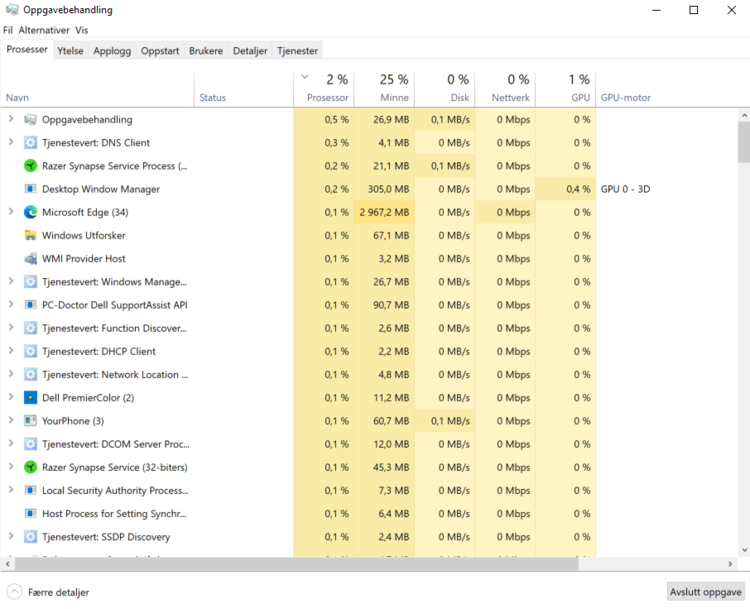
Check load in Task Manager
Open Task Manager and look at CPU usage while the machine is idle. If it stays high over time, for example above roughly 20 percent because of a program, update or malware running in the background, fix that first. If CPU usage is low but the fan still runs hard, the cooling system or an aggressive fan profile is more likely to be the cause.
Fan settings vary from model to model. If you want to investigate this yourself, search with the exact model number plus “reduce fan noise” or “fan control”, and be careful with advice written for other machines.
Do not use the PC on soft surfaces
Sofas, beds and blankets can block air intake. Use the machine on a hard surface and keep airflow around the vents. This helps most when the cooling system is otherwise healthy.
When heat needs service
If the PC becomes hot during light use, the fan runs constantly, or the machine shuts down, cooling, fan and thermal paste should be checked. Long-term high temperature can shorten component life.
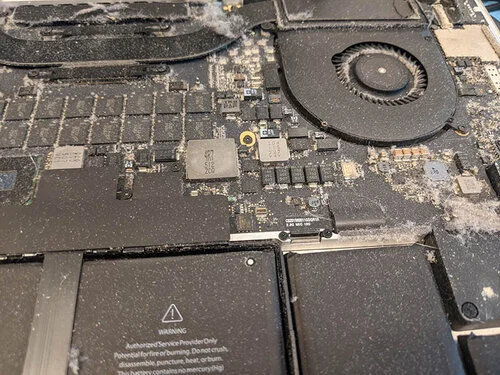
Dust can block airflow through the heatsink, so hot air cannot escape. The thermal paste between the processor and heatsink also loses effect over time, often after a few years of use. If the fan clicks, squeals, scrapes or starts making new mechanical sounds, the fan itself may be worn.
When to stop using it
Stop using the machine and have it checked if it smells burnt, shuts down repeatedly, becomes very hot around the battery or starts making new noises. Continued use can make the repair more expensive than necessary.